Zoom
Help remote workers see and reduce the cost of back-to-back meetings.
Overview
Role
Designer, Researcher
Timeline
3 weeks
Deliverable
High-fidelity prototype
Services
- Survey research
- Competitor analysis
- Affinity mapping
- RICE prioritization
- User flows
- Design system
- High-fidelity prototype
Team
- Team of designers and researchers
Industry
Productivity, SaaS
Opportunity
The more meetings a week, the harder it became for attendees to maintain energy and focus; nothing in the product helped. Jeff and I reviewed six articles, ran a 10-question survey, and audited Zoom, BlueJeans, and Macro. I synthesized the findings into two distinct causes. No competitor addressed either.
- Back-to-back scheduling with no visibility into weekly meeting load
- Audio issues and no turn-taking cues inside meetings
Meeting load made visible
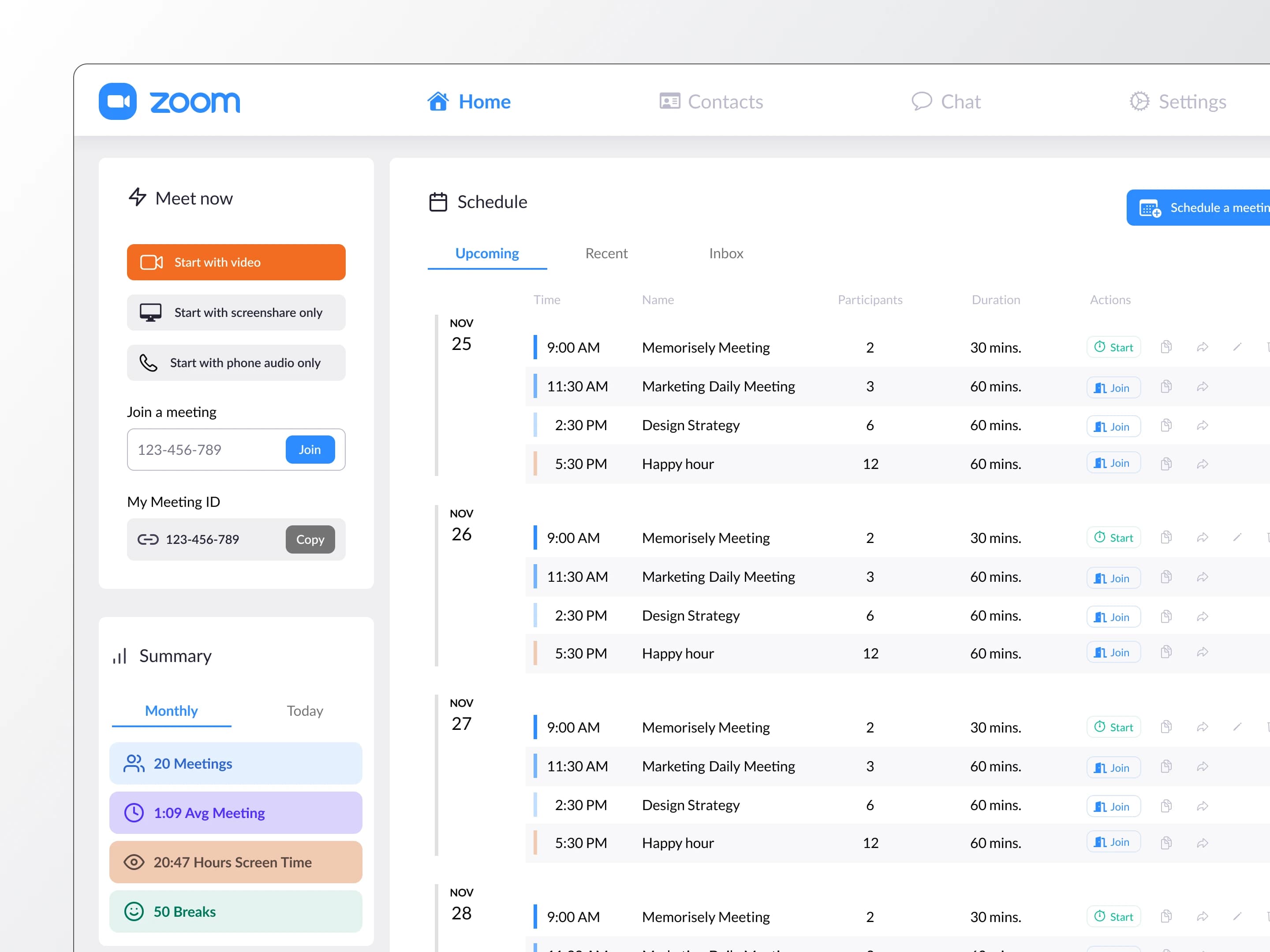
The default Zoom home screen was a meeting launcher, not a planning tool. Users had no way to see their weekly load or the compounding cost of back-to-back sessions. I designed the dashboard to surface four stats alongside upcoming meetings: total meeting count, average length, total hours of screen time, and number of breaks the new system enforced. The existing meet-now action stayed to preserve familiarity while adding visibility Zoom had never offered.
Breaks built in, not bolted on
Breaks in the existing Zoom scheduler were optional and easy to skip. I made them mandatory: every 25-minute block automatically includes a 5-minute break, built into the calendar rather than suggested after the fact. Users cannot schedule through a break; the system enforces it. Fatigue compounds when breaks are voluntary, so making them structural was the only intervention that would hold.
In a meeting
Research pointed to two in-meeting fatigue sources beyond scheduling: information overload from video, and lost context mid-meeting. I addressed both. An avatar-only toggle removes video feeds to reduce visual processing; self-monitoring on camera and reading body language both increase fatigue. The agenda stays visible in the meeting view so users always know what is next. A note-taking panel covers action items, questions, and takeaways without app-switching. A phone handoff lets users walk during calls, which lowers cognitive fatigue.
Outcomes
- We delivered three high-fidelity prototypes covering the dashboard, schedule, and in-meeting screens.
- We built a Figma design system to maintain visual consistency across all three screens.
- No user testing was conducted before the project ended. The designs were validated by research but never tested with real users; that is the gap I would close first in a follow-up.